

The small office phone system replacement
Replace your old phone system, keep your numbers
If your office phones run through a box in a cupboard with a maintenance contract attached, this page is for you. A hosted phone system moves that box to the cloud: your numbers stay the same, calls reach your team wherever they work, and the whole thing is priced per user per month on one bill.
You are in the right place if:
- Your office phones run through a PBX you own: a box in a cupboard with a maintenance contract, line rental, and a callout fee whenever anything needs changing.
- You run a small office (an accounting firm, a legal practice, a clinic, an agency) and you want phones that just work at a predictable monthly price, without becoming a phone expert.
- People now work from home, from other sites, or on the road, and calls to the office number still need to reach them.
Small offices are exactly who this page is for, so no size disclaimers here. If you are a larger organisation with contact centre requirements, call recording compliance, or a tender to answer, start with our VoIP phone services page instead: it carries the deeper technical and procurement detail your reviewers will ask for.
Owning a PBX vs renting a phone system
The box in the cupboard made sense when you bought it. Here is what actually changes when the phone system moves to the cloud.
The PBX you own today
- A maintenance contract on hardware that gets older every year
- Line rental and call charges spread across a bill nobody fully understands
- Handsets locked in to the system: adding or replacing one means a technician
- Changes like a new starter or a new greeting wait for a site visit
- If the box fails, the phones stop until someone comes out to fix it
A hosted phone system with Trucell
- One per user per month price that covers the system, upkeep, and support
- No PBX hardware to own and no separate maintenance contract
- The office number answered from a desk phone, a computer, or a mobile app, anywhere
- Changes made remotely as a support request, not a callout
- Phones, internet, and IT questions handled by one provider on one bill
What replacing your PBX includes
One project with one owner, planned so the office keeps taking calls while the system changes underneath.
Your numbers, ported with a rollback plan
Your main number and direct lines move across under a documented porting plan with test calls and a rollback path, so the number your clients dial keeps working.
Handsets, softphones, and mobile apps
Desk phones for the people who want them, a computer app for the people who do not, and a mobile app so the office number can ring wherever the day takes you.
Microsoft Teams Phone or 3CX, your choice
If your team already lives in Microsoft Teams, calls can land there too. If you prefer a traditional phone system feel, we deliver 3CX as a 3CX Silver Partner. We recommend one after seeing how your office actually works; both are covered in depth on VoIP phone services.
Call flows and an auto attendant
How calls move through the office, written down and set up: who rings first, where calls go when nobody answers, the press one for reception menu, and what callers hear after hours and on public holidays.
Training and an after hours cutover
The switch happens outside business hours, so your team finishes a day on the old system and starts the next on the new one. Before that, everyone gets a short walkthrough of the handsets and apps, and reception gets extra time on the call flows that matter most.
Ongoing support under one bill
After go live the phone system is supported like the rest of your IT: one number to call when something is odd, upkeep covered by the monthly per user price, and IT support on the same thread when the fault turns out to be the computer, not the phone.
How the pricing works
Hosted PBX is priced per user per month. That one price covers the phone system, its upkeep, and the support behind it. There is no PBX hardware to buy and no PBX hardware maintenance contract, because there is no PBX hardware.
The honest comparison is not the old system against the new one. It is everything you pay today (the maintenance contract, line rental, call charges, and callout fees) against one monthly figure that moves with your headcount: pay for the people you have now, add a user when someone starts, remove one when they leave.
So rather than publish a figure that fits nobody: bring your current phone bill and we will put the comparison side by side before you commit. If keeping what you have works out better, we will say so.
Put your phone bill next to a hosted price
Bring your latest bill to a 15 minute call. We map what you actually pay today against a per user per month price for your team, and tell you honestly whether switching stacks up.
Prefer to talk now?1800 316 529…Pick a time(opens Microsoft Bookings in a new tab)
What to include in your brief
- Your latest phone bill, including line rental and call charges
- Your PBX maintenance contract and its renewal date
- Who needs a desk phone, an app, or both
- Any fax, EFTPOS, lift, or alarm lines in the office
Hosted PBX questions from small offices
Direct answers to what owners and practice managers ask before replacing a phone system.
Will our numbers move without downtime?
Your numbers move under a documented porting plan with test calls and a rollback path. The switch is scheduled for a quiet window, usually outside business hours, and calls can be redirected during the changeover so callers still reach you. Porting is the part of the project we plan hardest, because the number your clients dial is the one thing that must not break.
What happens to our old handsets?
It depends on what they are. Some newer IP handsets can be set up again on the new system; older handsets tied to the PBX usually cannot. We check what you have during scoping and only include new handsets where they are actually needed. Many offices also find they want fewer desk phones once the computer and mobile apps are in place.
How long does a cutover take?
Most of the work happens before the switch: mapping your call flows, preparing the new system, and testing it alongside the old one. The cutover itself is scheduled outside business hours, so your team finishes a day on the old system and starts the next on the new one. Number porting runs on carrier lead times, which we confirm during scoping so the date is planned, not hoped for.
Can we keep our fax and EFTPOS lines?
Yes, and this is a standard part of scoping. Fax machines, EFTPOS terminals, lift phones, and alarm diallers often sit on old copper lines, and each one needs its own plan: some move to a modern alternative, some stay on a dedicated service. We walk through every line on your bill before anything is switched so nothing important goes quiet.
What does it cost?
Hosted PBX is per user per month, with the system, upkeep, and support inside that price, and no PBX hardware maintenance contract. Rather than a one size fits all figure, bring your current phone bill and we will put the comparison side by side before you commit, including the lines and contracts you would no longer pay for.
What small offices pair with their phones
The phone system rarely travels alone. These are the pages owners usually read next.
VoIP phone services
The full technical picture: call recording, compliance, and the detail larger rollouts and tenders need.
Read moreIT support
One support number for the phones, the computers, and everything between them.
Read moreBusiness internet and WAN
Calls are only as clear as the connection they travel on. Internet sized and set up with voice in mind.
Read moreIT support Parramatta
Local, accountable IT support for Western Sydney offices, with phones part of the same service.
Read moreMicrosoft 365 consultation
If calls should land in Teams, your Microsoft 365 setup and your phone system belong in one plan.
Read more
Related insights
View all articles →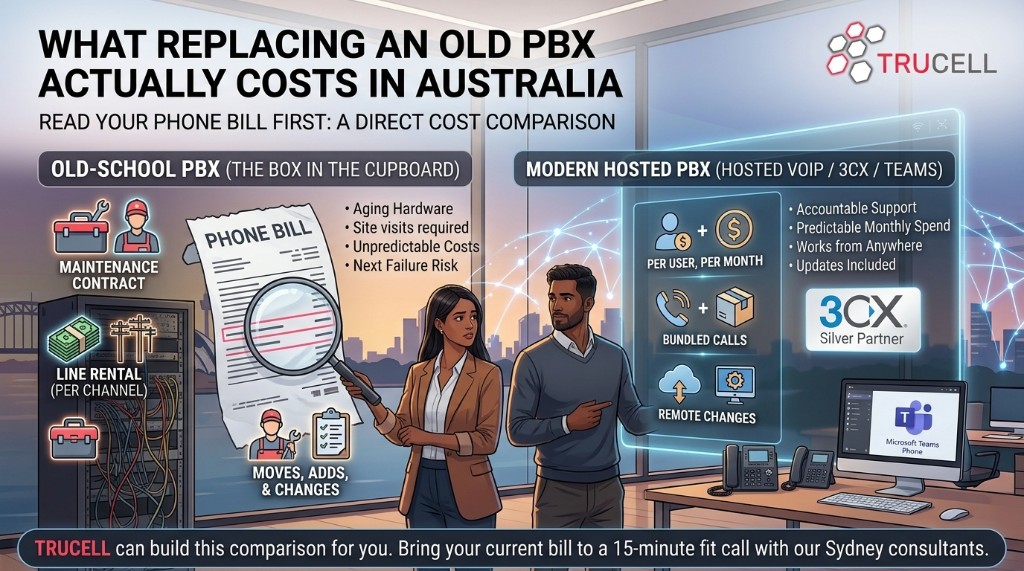
Keep your numbers, lose the phone box
3CX Silver Partner · Microsoft Teams Phone · Established 2005 · ISO 27001:2022 certified operations
Tell us what you run today and what it costs. You get a straight recommendation between Teams Phone and 3CX, a per user per month price for your team, and a cutover plan that keeps your numbers ringing.
Prefer to talk now?1800 316 529…Pick a time(opens Microsoft Bookings in a new tab)